

𝖑𝖔𝖗𝖊𝖓 𝖉𝖎𝖆𝖘 @lorendias@social.cleverlibre.org
#Developer #Programmer #WebDev #DevOps #Linux #LinuxMobile #LinuxGaming #Photographer #Fedi #Admin
** Boosts and Hyperlinks are not endorsements.
Joined Jun 2021
𝖑𝖔𝖗𝖊𝖓 𝖉𝖎𝖆𝖘
boosted

 GNOME the popular Linux desktop environment got €1M development boost 💰
They will:
►Improve current accessibility
►Design / prototype a new accessibility stack
►Encrypt user home directories individually
►Increase hardware support
►Invest in quality assurance / dev experience
►Expand / broaden freedesktop APIs
►Consolidate / improve platform components
GNOME is in top Linuxes such as Ubuntu, Fedora, Debian..
=> https://foundation.gnome.org/2023/11/09/gnome-recognized-as-public-interest-infrastructure
Props to #valve for crediting #archlinux and #kde on their new Steam Deck OLED page out today. #gaming #linux
Diversification is good and not putting all eggs into one basket. I hope to see the rise of peertube and other federated video tech platforms. Tilvids has done a excellent job.
𝖑𝖔𝖗𝖊𝖓 𝖉𝖎𝖆𝖘
boosted

LibreOffice Poll:
Do you want LibreOffice videos available via PeerTube?
PeerTube is a video platform for the Fediverse and is an alternative to Google's YouTube.
TILvids will give LibreOffice video space on their decentralized platform that is powered by PeerTube.
LibreOffice has 20.2K subscribers on their Google YouTube channel...
Please BOOST for greater exposure.
#LibreOffice #OpenSource #Fediverse #PeerTube #Privacy #TILvids #FOSS #FLOSS #Video #LibreSoftware @peertube @tilvids
I thought that #controlburns made sense in #california after hundreds of millions of trees were killed due to the bark beatle invasive species the last few years.
I trusted fellow humans would show intelligence and not have controlled burns 365 days a year on windy days and only when it was sane, boy was I wrong, turns out many humans optimize profits over intelligence, safety and ethics. Sad.
𝖑𝖔𝖗𝖊𝖓 𝖉𝖎𝖆𝖘
boosted

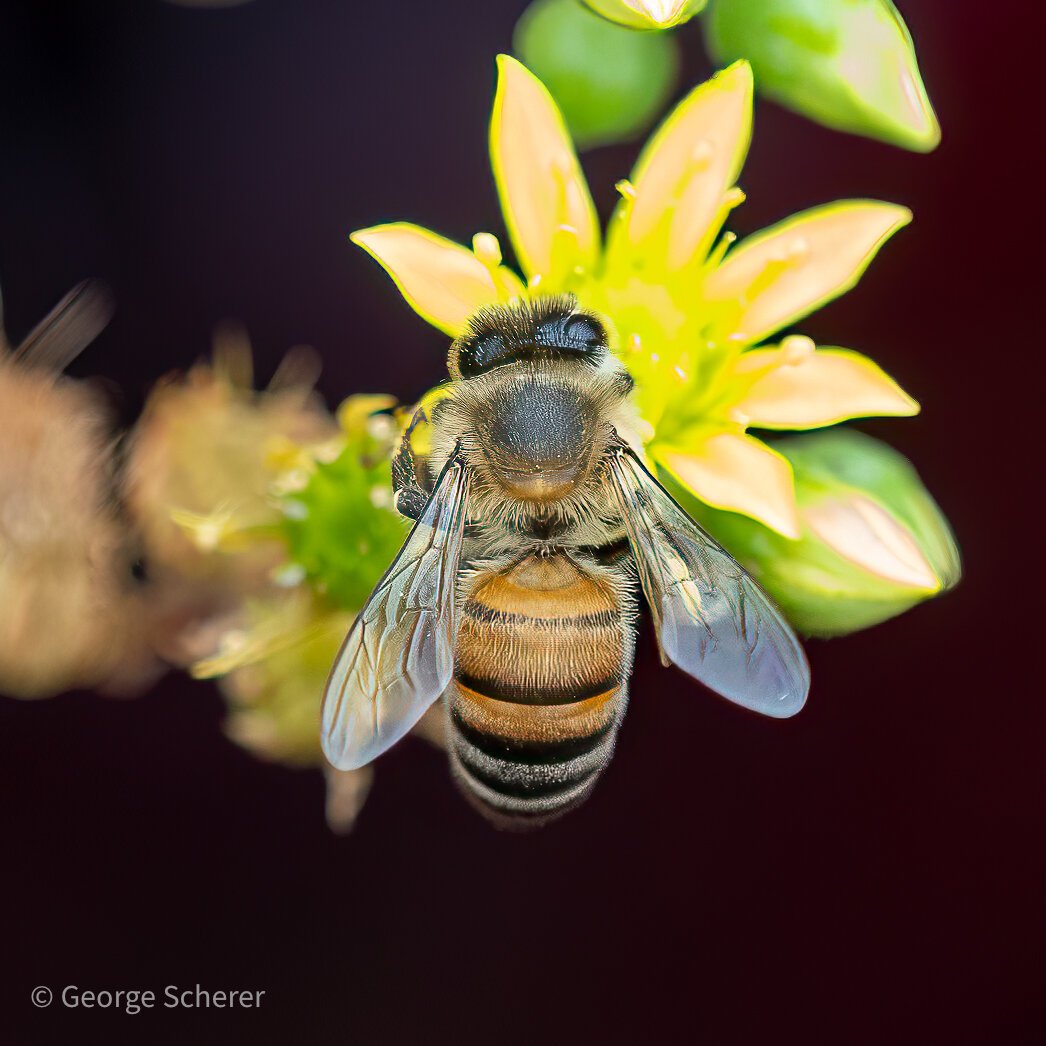
Western Honey Bee, June, 2023. The Huntington Library, San Marino, Callifornia, USA. #huntingtonlibrary #honeybee #beesofmastodon #omdsystem #omds #olympus ##mzuiko40150pro
I wish that file managers like #dolphin and #nautilus would thumbnail files based on their File Unique ID and not path, I have 150GB on 650 files from my photo shoot and the thumbnail generation takes a lot of resources where the thumbnail is thrown out when I rename the directory, or move the file into a sub-directory which can take 10 minuets just to create thubmbnails.
Also, when someone makes a #systemd #kio thumbnailer to automatically thumbnail paths let me know as it would really speed up my workflow to have the thumbnails ready to go when I enter the directory.
𝖑𝖔𝖗𝖊𝖓 𝖉𝖎𝖆𝖘
boosted

GNOME is (Gradually!) Dropping X11 https://tube.kockatoo.org/videos/watch/211aaf61-4716-4885-9e2e-5c13dcfbd8e0
@YaLTeR
This is very interesting, I really do like the idea of visual cues and just enough animations to communicate what is happening. I daily drive sway, and have had a watchful interest in hyprland for this reason, I do think there are a lot of ways this tech could innovate like having existing layouts with dead space blocks until filled with a new window, and resizing the parent container to not use 100% of the screen similar to 0:50
By the way what is the name of the paint app on the left? I'm not sure I've seen it before.
𝖑𝖔𝖗𝖊𝖓 𝖉𝖎𝖆𝖘
boosted


Decided to make a new demo video for niri, finally. The last one was so old that niri didn't even have cursors implemented, it showed an orange rectangle instead. 🫠
Here's the link again for the curious: https://github.com/YaLTeR/niri
Very happy I've come this far writing my own compositor from scratch. Honestly thought my motivation would only last for two weeks max, but here we are. 
Learned a ton in the process, and now this experience helps me with Mutter & Shell profiling.
#purism #librem11 #linuxmobile I was able to get #gnome #snapshot #camera app to open via flatpak, it would start with a black sceen, and then when I clicked switch app the Librem 11 front light would come on and after about 10 seconds it would snap a quick image before freezing.
It didn't save that image. But I was able to take a screenshot to show the quality comparison between #cheese and `gnome-snapshot`
I also tried to load #megapixels camera app, but it said
`Could not read device name from device tree. Could not find any config file.`

I decided to break out my commentary on the audio into it's own 2nd post (see profile). I also created a 3rd post where I decided to take 4 indoor example photos -- 2 with the front camera, and 2 with the back camera.
#cheese camera app for #gnome has pretty bad ms feedback for pretty much any webcam I've used, even the $200 logitech 4k cameras. And of course I doubt if there is a color profile added to these photos, maybe something that will change with the new Gnome Snapshot app.
Overall again, I am pleased, having a hobbyist farmiliarity with photography I am sure that this thing would shoot some great photos during the day, indoors and outdoor under more optimal cloudy lighting conditions.
I will definately be keeping an eye on what cameras are in Generation II devices in the #linuxmobile space, but until then this will do just fine for me like if I want to do a video call or whatnot.
Maybe I'll take those other example photos tomorrow if I remember.
#librem11 back camera 5mp test photo of a #sliger computer case shot indoor, at night with moderate to low lighting conditions (4/4) #purism #linuxmobile

#librem11 front facing camera 2mp test, looking up at a indoor hawaiian plumaria tree (3/4) #purism #linuxmobile

Librem 11, Front Camera Example, Indoor Lighting at Night (2/4) #librem11 #purism #linuxmobile

Regarding the #purism #librem11 5mp back camera and 2mp front camera. I have taken 4 test shots using #cheese.
The color gradation profile could be updated to improve the color accuracy, and while not a camera for professional use, I am pleased with the results.
The first picture is the 5MP back camera
(1/4)

Regarding commentary on the audio, one of my room mates is a audio engineer and asked me how the volume is. I checked again and it is pretty loud overall. I keep it about 80% and my spouse says she can hear it through her open back headphones pretty well and is singing along. So when compared to cellphones, a big step up.
Here is what I am listening to: Gabriel & Dresden ( https://youtube.com/watch?v=ucif5TtF9dQ )
Regarding the other specs, I did notice when looking at Starlite 5 again that each camera is only 2 MP and the Librem 11 has a 5 MP back camera.
Also, I keep forgetting that Librem 11 has 1TB NVME storage, I am floored, I am used to only having maybe 32GB when using a cellphone for the Linux OS portion and i typically offload any heavy content to a (hopefully Gen2 speed) MicroSD card slot.
Because the form factor is 16:10 and not 3:2 I think with the keeb it is more compact and would fit better on a small table or at a coffee shop. I am not particularly big on "Track Pads" though if it's there I'll use it. Something to consider too when comparing #librem11 against the #starlite5
I do like 3:2 form factor okayish too, what I really hate is 16:9.
As a programmer I am fairly happy with the key set, though I would note that I don't see a [ Insert ] key for vim usage, the arrow keys will take a little getting used to but I am already adapting just fine. Also I don't think there is a print screen key and I had to installed my "Screenshot" app separately through Flathub, maybe I can create a keybinding to work around one or both of these issues. I do think the adage you get what you pay for is often true, and the build quality, materials, aluminum keys, aluminum case edge and so on do present nicely and have the QA I would hope to expect.
Also in earlier posts I was skeptical of the air vent holes on the side in case water got on the device in the bottom left area when docked with the keeb. I thought that this would be a bigger issue for me, but it seems to be a non-issue. Just wanted to put that out there.
Regarding my confusion about the keyboard and case cover, for some reason I thought the #librem11 was supposed to fold down like the #starlite5 on the right. Now that I understand the magnetic cover I would love to see of the the way the case is a kickstand on the starlite impairs functionality or not. It's so hard to get this kind of experience without buying both and getting it hands on.

#Developer #Programmer #WebDev #DevOps #Linux #LinuxMobile #LinuxGaming #Photographer #Fedi #Admin
** Boosts and Hyperlinks are not endorsements.
Joined Jun 2021
