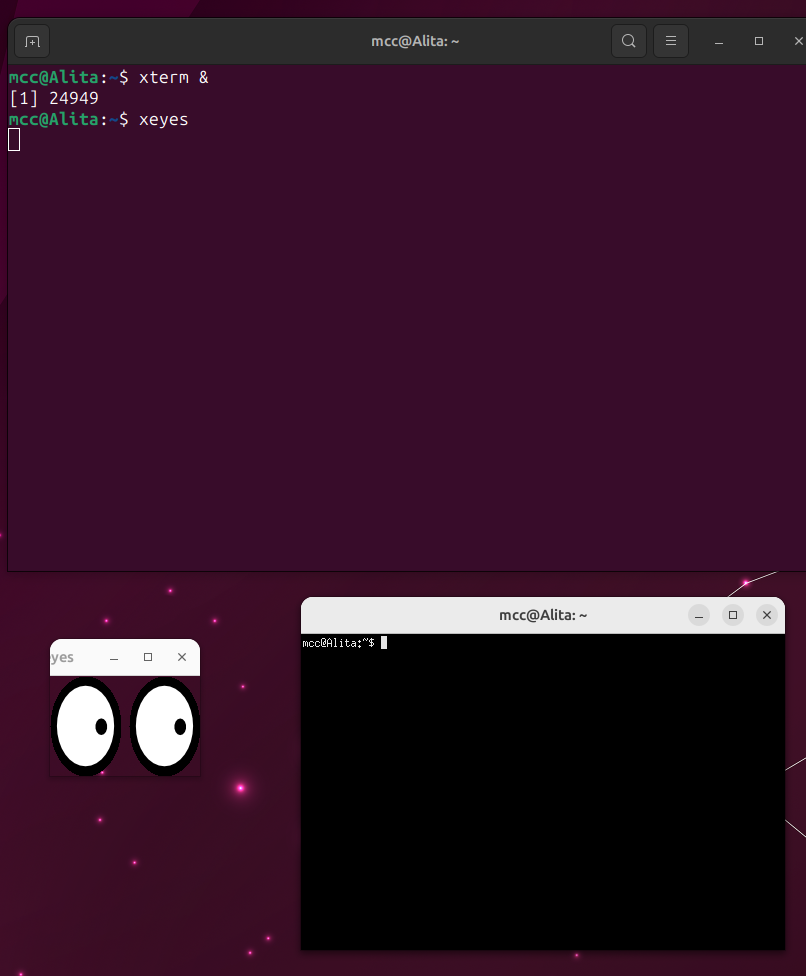
Continued absurd Linux problems:

If I run in Wayland,
and run Chrome,
my custom .XCompose file is ignored.

Chrome on X11 does not have this problem,
Wayland apps other than Chrome do not have a problem,
if I use default XCompose sequences instead of custom XCompose there is no problem.

It's just this one combination of things.

Checking the Chromium bug tracker I find variations of this bug repeatedly filed, then closed, as far back as 2015 and as recently as 2021, closed as "fixed".

So I'm sitting here trying to figure out how to tell if a particular app is running in Wayland or XWayland.

This is the answer I get off Stack Overflow. I'm thinking… No. No, that's too silly. It can't be the best way.

I keep researching. It's the best way.

You run xeyes.

Wayland has security that keeps windows from knowing about mouse events in other windows. XWayland doesn't.

Xeyes will track your cursor whenever you're over an XWayland window, then stop if you pass over anything else.

Follow

@mcc

In my desktop, all Electron apps seem to be running on XWayland, same with browsers. So getting Chrome & Electron to run on Wayland will be a big step forward for Wayland.

Sign in to participate in the conversation
CleverLibre Social

CleverLibre Social is an inclusive social instance for open discussion, learning, and community.
All cultures welcome.
Hate speech and harassment strictly forbidden.