
My biggest pet peeve of using #jupyternotebook (coming from #rstats / #rstudio ) is that you can't see all the dataframes that you have either loaded or have wrangled and created in this session.
It is a big positive of using RStudio. You can quickly take a glance or scroll through if needed.
Is there a way to do this in Jupyter Notebook?

@shibaprasad not sure if there is a solution for Jupyter Notebook, but Spyder (my preferred Python IDE) has a good variable explorer: https://www.spyder-ide.org/
@gmschroe Thanks! This looks promising.

@shibaprasad will
ls()
Give the list of objects in a #jupyternotebook #RStats session?
But yes, having a dedicated place to see them is definitely a plus of an actual IDE.

@shibaprasad did you try this? https://jupyter-contrib-nbextensions.readthedocs.io/en/latest/nbextensions/varInspector/README.html Also I recommend PyCharm by @jetbrains which also has a free community edition!

@shibaprasad I'm not sure if this is a native feature of Jupyter but in VS code there is the variables view (at least when using Python).
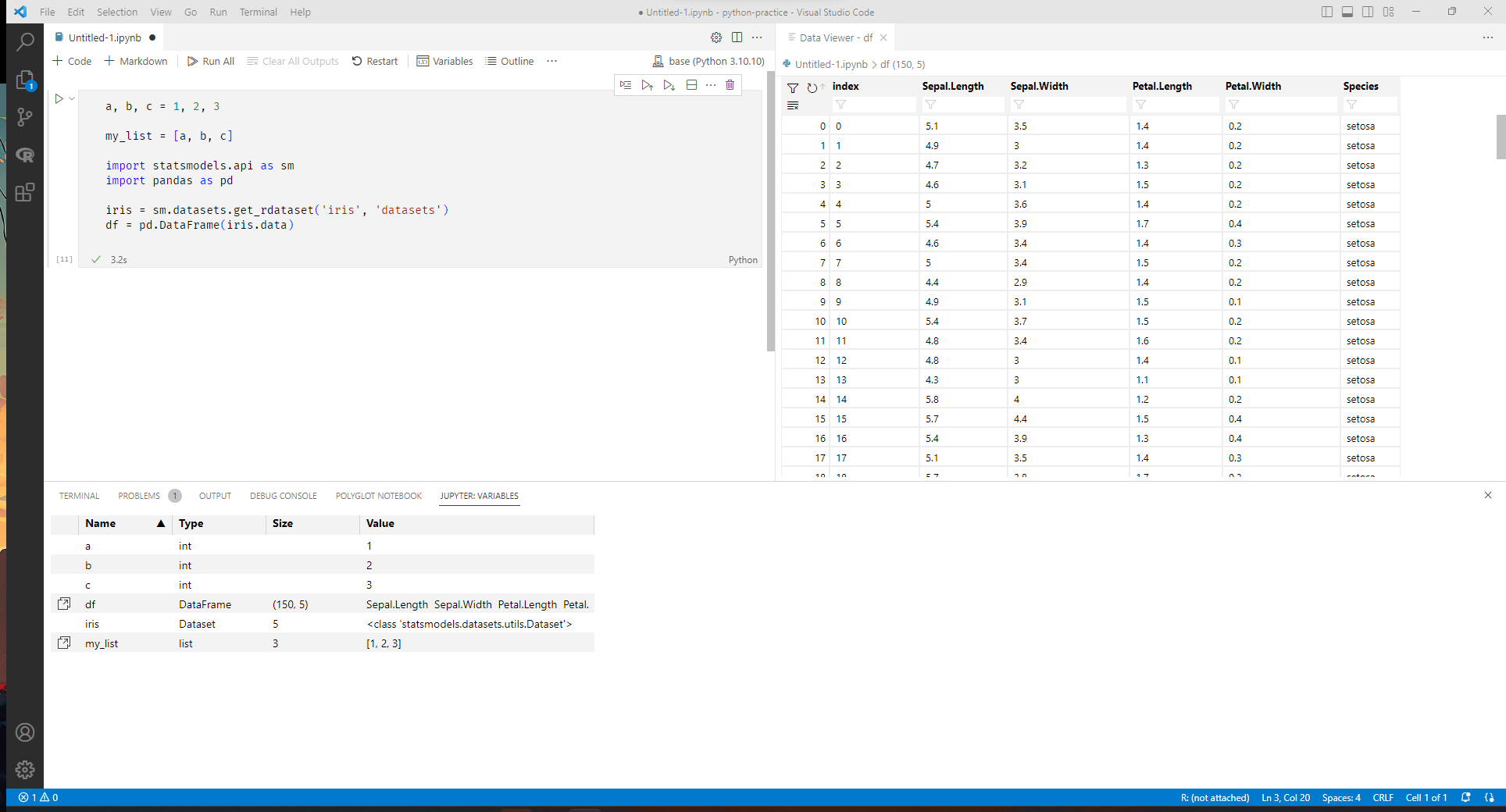
@joshpersi Wow great. Yes, was looking for something like this. Thanks.

Come to think of it, this might be exclusive to RStudio only? Though I must say, it is a great feature.